API quickstart
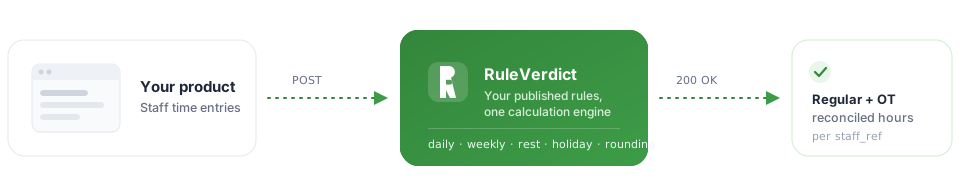
RuleVerdict turns your staff time data into computed overtime outcomes over one API call — no need to hardcode overtime rules in your own product. Every request is authenticated with an API key scoped to your organization; every response comes straight from the same calculation engine your dashboard's rule editor uses.
1. Get an API key
Create one from your dashboard's Settings → API keys page. The key is shown exactly once, at creation — copy it somewhere safe.
2. Author and publish your overtime rules
Before you can evaluate anything, your organization needs at least one published ruleset —
open your organization → Open rule editor in the dashboard and build one
there. Every rule you publish gets a key (e.g. warehouse-ca) — that
key is the ot_context you'll reference in step 3 below. A call naming an
ot_context with no matching published ruleset fails with a 422.
Starting from scratch? Paste your contract or CBA text into the rule editor's "Draft with AI" panel and it drafts the accumulators and rules for you — still a draft until you review and publish it yourself.
3. Call the evaluate endpoint
Send the API key as a bearer token, and a list of staff time entries. You never send which organization the request is for — that's resolved from the key itself.
curl https://api.ruleverdict.example/v1/evaluate/ \
  -H "Authorization: Bearer rsk_live_..." \
  -H "Content-Type: application/json" \
  -d '{
    "staff": [
      {
        "staff_ref": "emp-123",
        "entries": [
          {
            "ot_context": "warehouse-ca",
            "date": "2026-09-01",
            "start_time": "08:00",
            "stop_time": "17:00"
          }
        ]
      }
    ]
  }'
import requests
response = requests.post(
"https://api.ruleverdict.example/v1/evaluate/",
headers={"Authorization": "Bearer rsk_live_..."},
json={
"staff": [
{
"staff_ref": "emp-123",
"entries": [
{
"ot_context": "warehouse-ca",
"date": "2026-09-01",
"start_time": "08:00",
"stop_time": "17:00",
}
],
}
]
},
)
print(response.json())const response = await fetch("https://api.ruleverdict.example/v1/evaluate/", {
method: "POST",
headers: {
Authorization: "Bearer rsk_live_...",
"Content-Type": "application/json",
},
body: JSON.stringify({
staff: [
{
staff_ref: "emp-123",
entries: [
{
ot_context: "warehouse-ca",
date: "2026-09-01",
start_time: "08:00",
stop_time: "17:00",
},
],
},
],
}),
});
const data = await response.json();
console.log(data);A typical response:
{
  "results": [
    {
      "staff_ref": "emp-123",
      "entries": [
        {
          "ot_context": "warehouse-ca",
          "date": "2026-09-01",
          "outcomes": [
            {"rule_key": "daily_ot_over_8", "outcome_type": "...", "payload": {}}
          ],
          "reconciled": {}
        }
      ]
    }
  ]
}
4. Large batches, or ask to be queued
A large enough request is queued instead of answered immediately — you'll get back
{"task_id": "...", "status": "queued"} with a 202 status. Poll
GET /v1/evaluate-jobs/{task_id}/ with the same API key
until status is "complete" or "failed".
Add "queued": true to the request body to force this path for a smaller batch
too — the only way to get a webhook (below) instead of an immediate response.
5. Webhooks, instead of polling
Add a "callback_url" to the request and, once a queued job finishes (or
fails), RuleVerdict's calculation engine POSTs it the exact same body a poll would return —
no need to keep asking:
{
  "staff": [ ... ],
  "queued": true,
  "callback_url": "https://your-app.example/webhooks/ruleverdict"
}
Delivered to your endpoint:
{
  "task_id": "...",
  "status": "complete",
  "results": [ ... ]
}
Delivery is best-effort — a few retries, then it gives up — so a missed webhook is never a
lost result: GET /v1/evaluate-jobs/{task_id}/ still has it. Only
plain http(s) URLs are accepted, and the target can't be a loopback or
private-network address.
6. Rate limits
Each API key is limited to a number of requests per minute set by your organization's plan
(see pricing). A request over the limit gets back a
429 status.
Full reference
Every field, status code, and error shape is documented in the generated API reference: